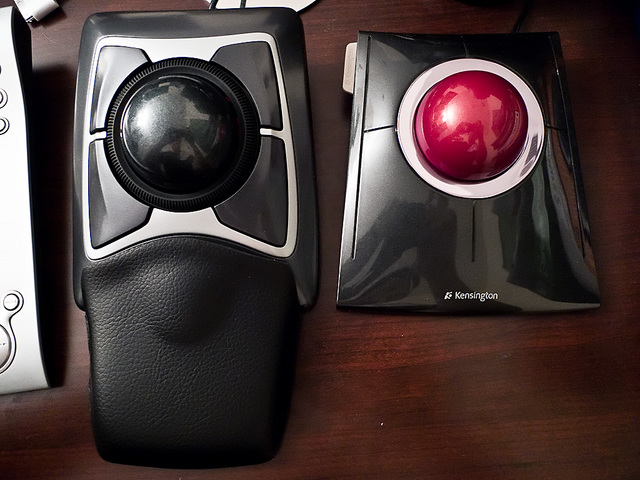
After a few days of use, I decided that the previously reviewed Kensington Slimblade Trackball could not overcome the handicap of not being able to program its two top buttons. Being unable to easily go back or forward a page while in a browser was severely crimping my style. ;-p So I picked up the 6 year old Kensington Expert Mouse instead. As you can see from the photo above, the two are pretty similar physically from a width and length perspective.

But as you can see above, the main difference in the dimensions of the two are in the height. Although here the difference isn't as bad as when compared to the even older Turbo Mouse Pro. And the trackball itself is interchangeable between the Expert Mouse and the Slimblade.
Functionally, the scroll ring around the trackball of the Expert Mouse is super easy to use. At first I was afraid it would be too stiff but it's actually quite loose. There is a little bit of a grating noise when you're spinning it but nothing horrible. The faux leather wrist rest is nice, something I did miss with the Slimblade.
Most importantly of all, I could program the top two buttons again. However, not everything is all roses. The main issue I ran into is that Kensington's Mouseworks app absolutely does NOT want to recognize its own peripherals when they are connected via USB hub. Could not get it to work no matter what I tried. If I plugged the trackball in directly to my laptop or desktop, they were detected just fine. And without recognition by Mouseworks, programmability can not be achieved. Luckily, other 3rd party shareware exists that fill in the gap, namely Steermouse on the Mac and ATNSoft Key Manager on the PC. Yes I do lose functionality like chording but I never used that anyway. As long as I can finally program my top two buttons, I'm happy.
So I guess I'm done fiddling around with my at-home pointing device. Still disappointed that the Slimblade Trackball didn't work out. Hopefully Kensington will eventually come to their senses and make their buttons programmable again. Or at least throw in dedicated back/forward buttons. =p


Comments (1)
I came by looking for a comparsion between the Kensington Expert and Slimblade trackball. You are the first one who spend a few words about the hardware and not the software at the beginning; but everyone get stuck on the software lately. I don't get it especially when you said that your already passed the buggy software shipped with the trackballs.
So what is your reason to continue to use the "old" Expert trackball even though you found better ways to fit the buttons to you needs?! Why should't work these tools for the Slimblade too?
Could you offer me a simple hardware based comparison of the two trackballs? How they "feel" how the sound. Also I see there a lot potential advantages on the slim assemble for the daily use comfort in contrast to the high Expert trackball.
What trackball do you would recommend if you leave software aside?
Posted by Wasp | September 14, 2012 5:19 PM
Posted on September 14, 2012 17:19